用 CC Switch 接入 Ainzy Connect Ainzy with CC Switch
CC Switch 是一个开源(MIT)的桌面小工具,专门用来管理 Claude Code、Codex、Gemini CLI 等命令行工具的供应商配置。装好之后,回到 的「API 密钥」页,找到要用的 key,点一下「导入到 CCS」,端点、key、模型会自动帮你填好——不用抄任何一行配置。 CC Switch is an open-source (MIT) desktop utility that manages provider configs for Claude Code, Codex, Gemini CLI and friends. Once it’s installed, go to the API Keys page on , find the key you want, and click “Import to CCS” — the endpoint, key and model are filled in for you automatically. No config to copy by hand.
00 它解决什么问题What it solves
Claude Code 和 Codex 的供应商设置是写死在配置文件里的(~/.claude/settings.json、~/.codex/config.toml)。只用一个供应商时手改一次就完事;一旦手里有多把 key、多个分组,或者还要在几家之间来回切,手改就开始出错。CC Switch 就是替你管这些文件的。
Claude Code and Codex keep their provider settings in config files (~/.claude/settings.json, ~/.codex/config.toml). With a single provider you edit them once and forget it — but once you have several keys, several groups, or you switch between vendors, hand-editing starts going wrong. CC Switch manages those files for you.
- 一个分组存一条 provider,之后在托盘菜单点一下就切,不用再开配置文件。 One provider entry per group, then switch from the tray menu — no opening config files.
- 填好 key 和端点后点「获取模型」,自动拉出你这把 key 真正能用的模型,不用照抄别人的模型名。 With the key and endpoint filled in, fetch models pulls the exact list your key can use — no copying model names from someone else.
- 同时接了几家的话,端点测速能直接比延迟。 If you use several vendors, the built-in endpoint speed test compares latency.
- 全程图形界面,不需要执行任何脚本——公司管控、不让跑 .bat / PowerShell 的电脑也能用。 All GUI, no scripts to execute — works on locked-down corporate machines that block .bat / PowerShell.
- Claude Code 和 Codex 的配置放同一个地方管。 Claude Code and Codex configs live in one place.
01 一键接入(推荐,全程不用复制粘贴)One-click import (recommended, nothing to copy)
先点上面的「下载 CC Switch」装好最新版,然后: First click “Download CC Switch” above and install the latest build, then:
- 打开
的「API 密钥」页。 Open the API Keys page at. - 找到要用的那把 key,点它右侧操作里的「导入到 CCS」。
Find the key you want to use and click “Import to CCS” in its row actions.
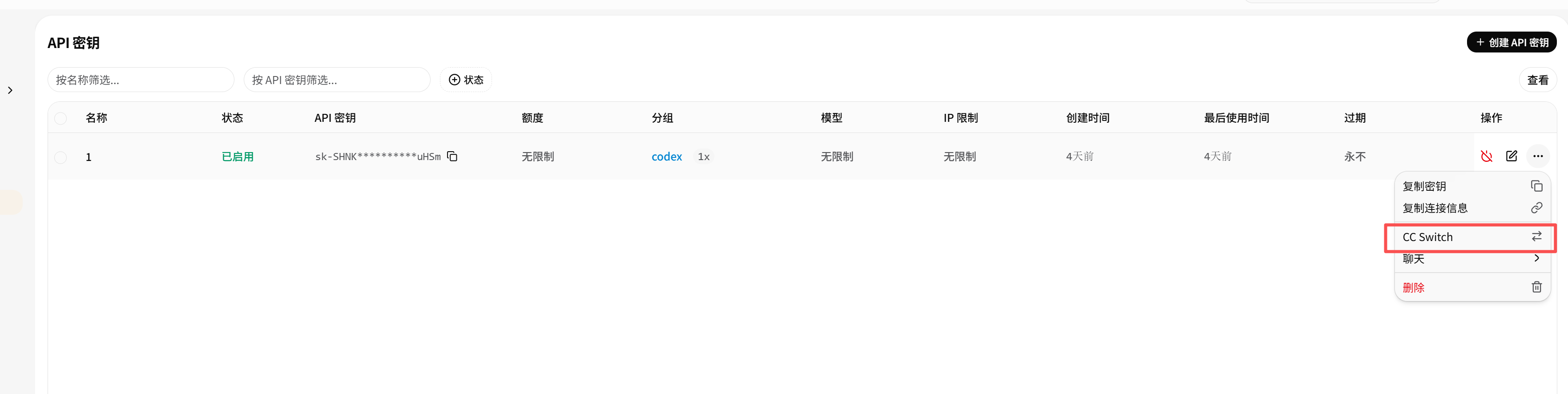
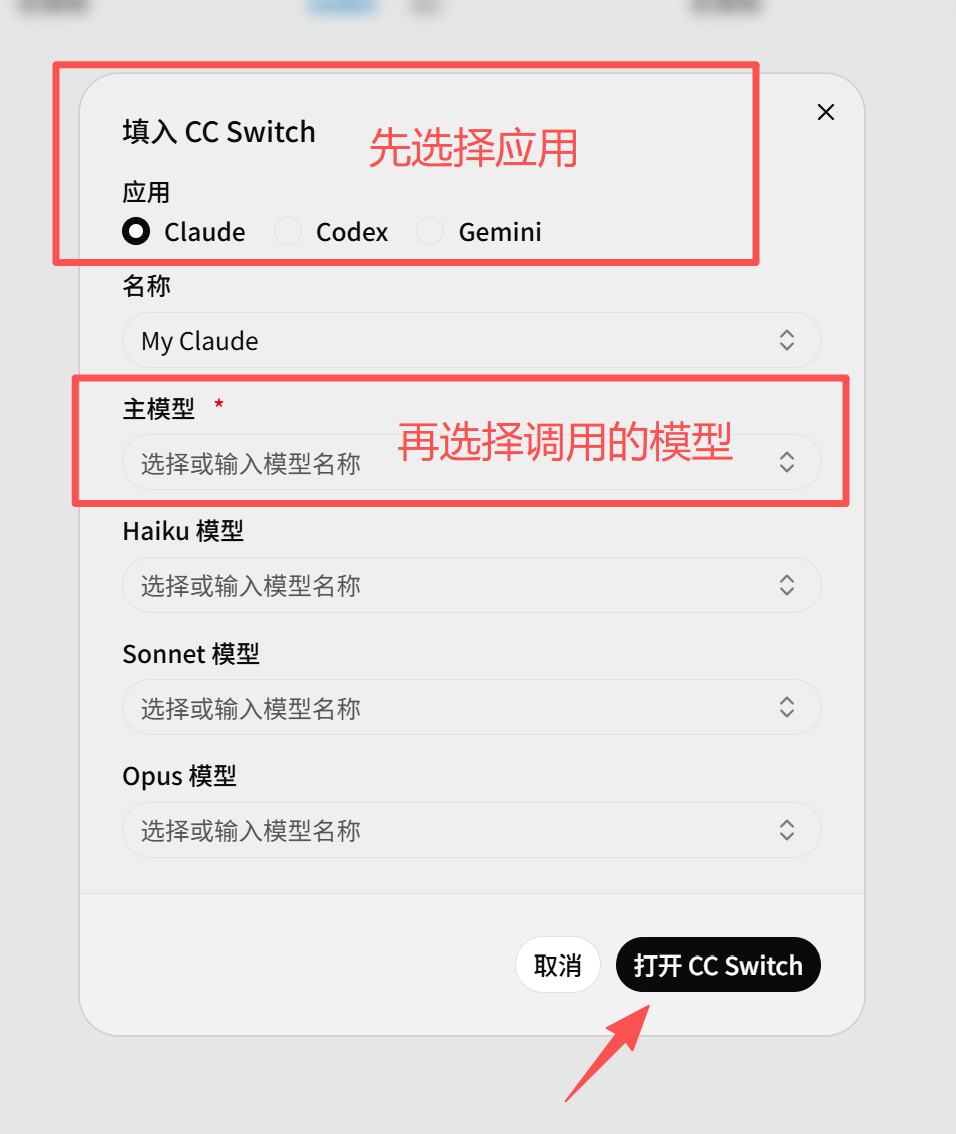
- 弹出「填入 CC Switch」窗口后,先选择应用,再选择要调用的主模型,然后点击「打开 CC Switch」。
In the “Fill in CC Switch” window, choose the app, choose the main model, then click “Open CC Switch”.
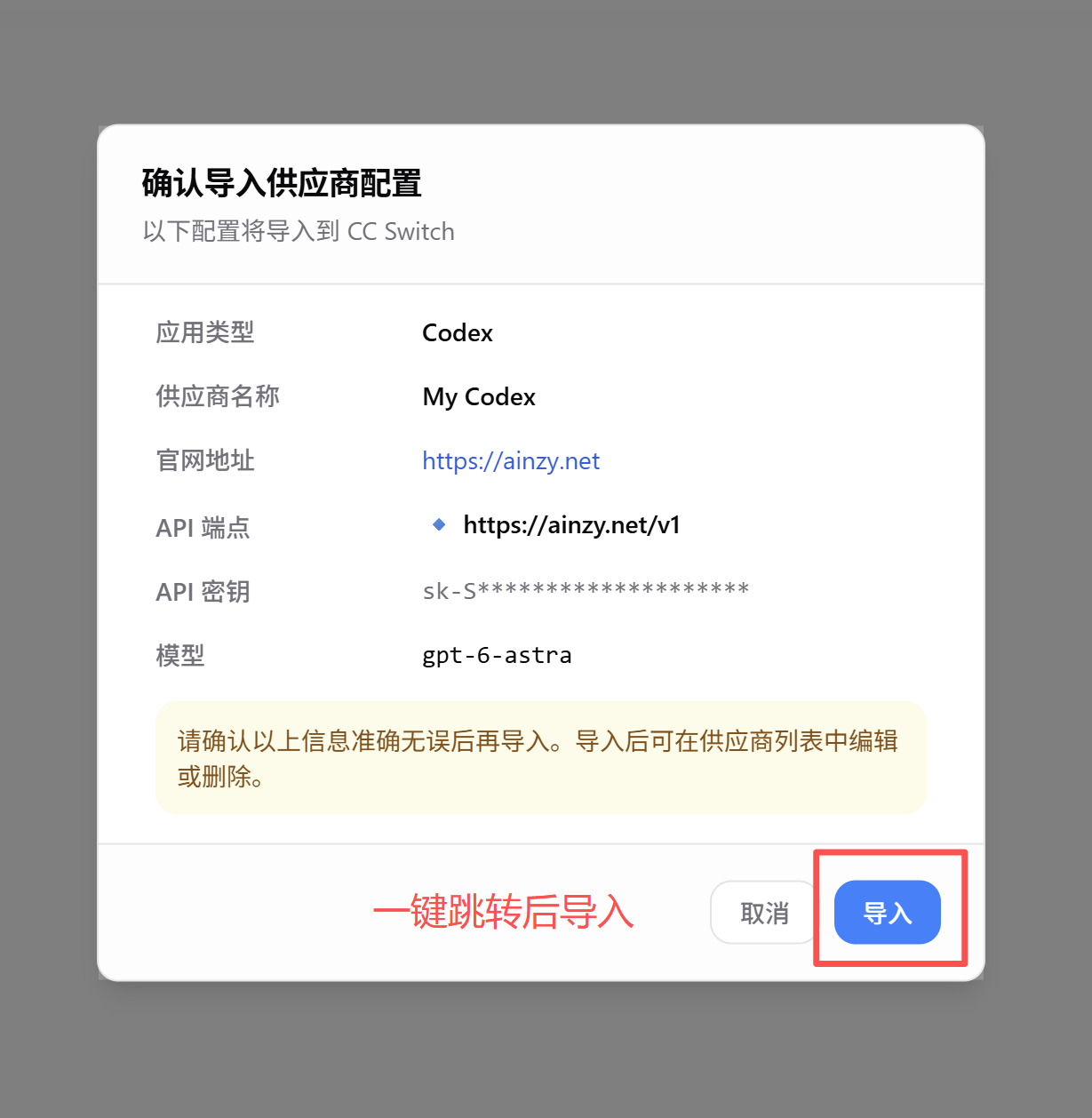
- 浏览器会跳出去拉起 CC Switch,自动新增一条 provider——端点、key、模型全部帮你填好,Claude Code / Codex / Gemini CLI 用的格式也会自动选对。然后核对「确认导入供应商配置」里的信息,点击「导入」。
Your browser will open CC Switch and add a provider automatically — endpoint, key and model are filled in, with the right format for Claude Code / Codex / Gemini CLI. Review the “Confirm provider import” details and click “Import”.
- CC Switch 里点启用就行。Codex 记得退出 Codex 软件后重新打开,Claude Code 记得开新会话(不用重启软件)——旧终端/旧会话里的环境变量不会自己更新。 Hit Enable in CC Switch. For Codex, quit and reopen the app; for Claude Code, start a new session (no app restart needed) — an existing shell/session keeps its old environment.
导入按钮打不开 CC Switch?手动加一条 Import button not opening CC Switch? Add one by hand
在 CC Switch 对应的应用下点 + → 自定义,只填两项: In CC Switch, under the matching app, click + → Custom and fill in just two fields:
- API Key:你的 keyAPI Key: your key
- 请求地址:Claude Code 填
,Codex 填Endpoint:for Claude Code,for Codex
其它全部保持默认,保存即可。提示「模型不存在」时,点「获取模型」→「一键设置」。 Leave everything else at defaults and save. If you see “model not found”, click “Fetch models” → “One-click setup”.
02 多把 key 怎么管Managing several keys
这才是用 CC Switch 的主要理由。每把 key 都用一次「导入到 CCS」,一个分组一条 provider,名字默认就是分组名,别拿一条来回改——改来改去很容易把上一条覆盖掉。 This is the main reason to use it. Run “Import to CCS” once per key — one provider per group, named after the group by default. Don’t keep editing a single entry back and forth — that’s how you overwrite the previous one.
- 托盘菜单里能直接切,不用打开主界面。 Switch straight from the tray menu without opening the window.
- 备注栏写上用途、到期时间,卡片上会显示,也能搜。 Use the note field for purpose and expiry — it shows on the card and is searchable.
- 切换之后 Codex 要重开终端、Claude Code 要重开会话才生效。 After switching, Codex needs a new terminal and Claude Code needs a new session.
- 如果你同时接了我们和别家,可以用「端点测速」比一下延迟。 If you also use other providers, the built-in endpoint speed test compares latency.
03 出问题先看这里Troubleshooting
| 现象Symptom | 原因 / 处理Cause / fix |
|---|---|
| 点「导入到 CCS」没反应“Import to CCS” does nothing | CC Switch 没装,或者装的是旧版没注册好协议。先按第 1 步装最新版,装完重新点一次导入按钮(不用刷新页面)。 CC Switch isn’t installed, or an old build didn’t register the protocol handler. Install the latest build from step 1, then click import again — no page refresh needed. |
401 |
key 抄错,或者前后带了空格 / 换行。重新复制一遍,别手打。 Wrong key, or stray spaces/newlines around it. Re-copy it; don’t retype. |
404 |
端点填错。Codex 用 /v1);Claude Code 用 /v1)。
Wrong endpoint. Codex uses /v1); Claude Code uses /v1). |
| 「获取模型」失败Fetch models fails | 401 就是 key 的问题;超时先查网络。我们的 /v1/models 是通的。
401 means the key; a timeout means the network. Our /v1/models works. |
| 模型不存在 / 无可用渠道Model not found / no channel | 这把 key 所在分组没有那个模型。点「获取模型」看真实清单,别照抄别人的模型名。 That model isn’t in your key’s group. Hit fetch-models for the real list instead of copying someone else’s model name. |
| 改了配置没反应Changes have no effect | 十有八九是没重开终端;再不行就是机器上还有别的工具在写同一个配置文件,先把它还原掉。 Nine times out of ten you didn’t open a new terminal; otherwise another tool on the machine is writing the same config file — undo that one first. |
| 桌面应用卡在 「完成 Windows 设置」Desktop app stuck on “Finish Windows setup” |
跟 CC Switch 和我们都无关,是 ChatGPT 桌面应用自带的 Windows 沙箱组件装不上(OpenAI 侧已知问题)。改用 Codex CLI 就能绕开。 Unrelated to CC Switch or to us — it’s the ChatGPT desktop app’s Windows sandbox component failing to install (a known OpenAI-side issue). Use the Codex CLI instead and it’s bypassed. |
04 关于你的 keyAbout your keys
CC Switch 把所有供应商配置(含 key)存在本机 ~/.cc-switch/cc-switch.db,备份在 ~/.cc-switch/backups/,都是明文的本地文件,不上传。所以:这台机器谁能登录,谁就能看到你的 key。共用电脑请用完删掉 provider。
CC Switch keeps every provider config (keys included) in ~/.cc-switch/cc-switch.db locally, with backups in ~/.cc-switch/backups/. Plain local files, never uploaded — which also means anyone who can log into this machine can read your keys. On a shared computer, delete the provider when you’re done.
导出的 .sql 备份里同样含 key,别往群里发。key 泄露了就到控制台重置一把新的。
Exported .sql backups contain the keys too — don’t share them. If a key leaks, rotate it from the console.
另外,它里面有个「用 ChatGPT 账号登录反代 Codex」的功能——那是拿你自己的 ChatGPT 订阅走逆向 OAuth,跟 Ainzy 无关,有封号风险,用不用你自己判断。 It also ships a “log in with ChatGPT to reverse-proxy Codex” feature — that uses your own ChatGPT subscription over a reverse-engineered OAuth flow, has nothing to do with Ainzy, and carries account-ban risk. Your call.